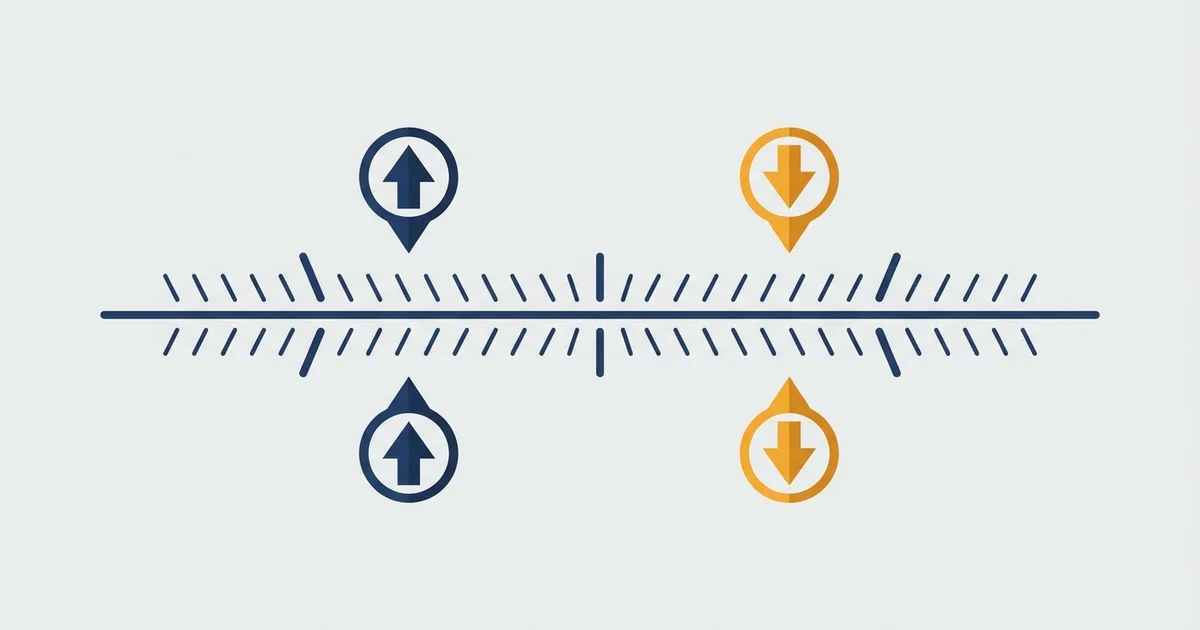

Where every order type sits relative to price
An order is either fill-now or fill-later. The fill-later ones sit above or below the current price, and which side they sit on tells you exactly what they do.
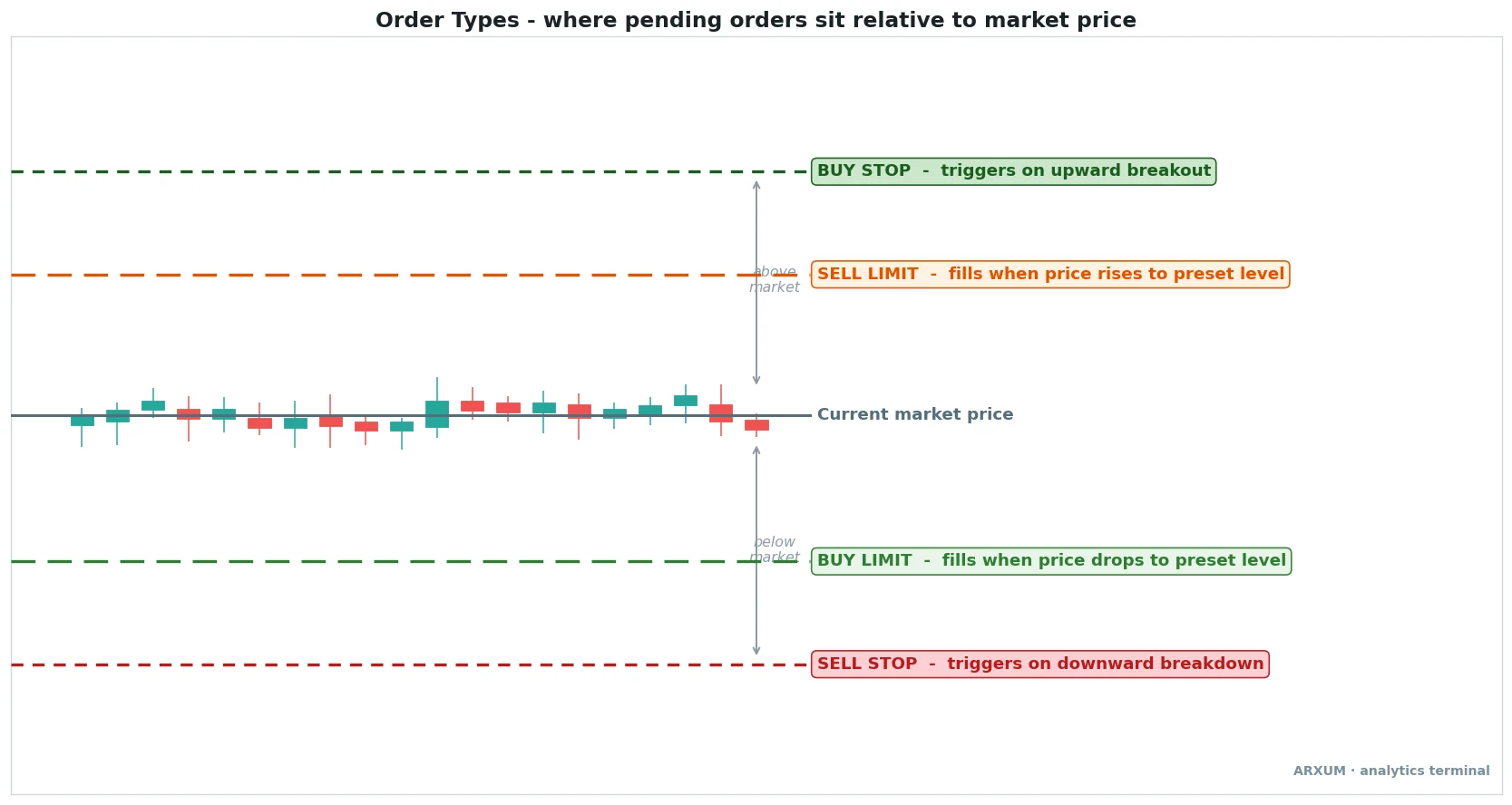
Read the diagram from the middle line out. The solid line is the current market price.
Everything else is an order waiting to become active.
- Buy stop, above market: waits above price and fires when the market breaks up through it. A momentum entry.
- Sell limit, above market: waits above price and sells the moment the market rises to it. Selling into strength.
- Buy limit, below market: waits below price and buys the moment the market drops to it. Buying the dip.
- Sell stop, below market: waits below price and fires when the market breaks down through it. A momentum short, or the exit on a long.
The one-line rule: limit orders wait for a better price, stop orders wait for a breakout. A limit buys low or sells high. A stop chases a move once it starts.
| Pending order | Sits | What it does |
|---|---|---|
| Buy stop | Above market | Triggers on upward breakout |
| Sell limit | Above market | Sells into strength at a preset price |
| Buy limit | Below market | Buys a dip at a preset price |
| Sell stop | Below market | Triggers on downward breakdown |
Market orders: fill now, pay the spread
A market order is the simplest instruction on the ticket. It says “get me in (or out) right now at the best available price,” and it does exactly that.
How it behaves:
- Fills almost instantly in any liquid market like EUR/USD, gold or Bitcoin.
- Takes the current ask when you buy and the current bid when you sell, so you pay the spread, the gap between those two prices, on the way in.
- In fast or thin conditions the fill price can differ from the last quote you saw. That gap is slippage.
- It is the only order that guarantees execution, because it accepts whatever price the book offers.
| Role | How to use it | Best read |
|---|---|---|
| Instant entry | Tap buy or sell | When being in beats the exact price |
| Instant exit | Close at market | Cutting a loss you want gone now |
| News trading | Fire on the release | Accept slippage for speed |
Rule of thumb: reach for a market order when certainty of execution matters more than a few pips of price. On a wide-spread pair or a quiet crypto pair after hours, that cost adds up, so it is not a free button.
Limit orders: name your price, then wait
A limit order lets you pick the exact price you are willing to trade at, and it only fills there or better. A buy limit sits below the market, a sell limit sits above it.
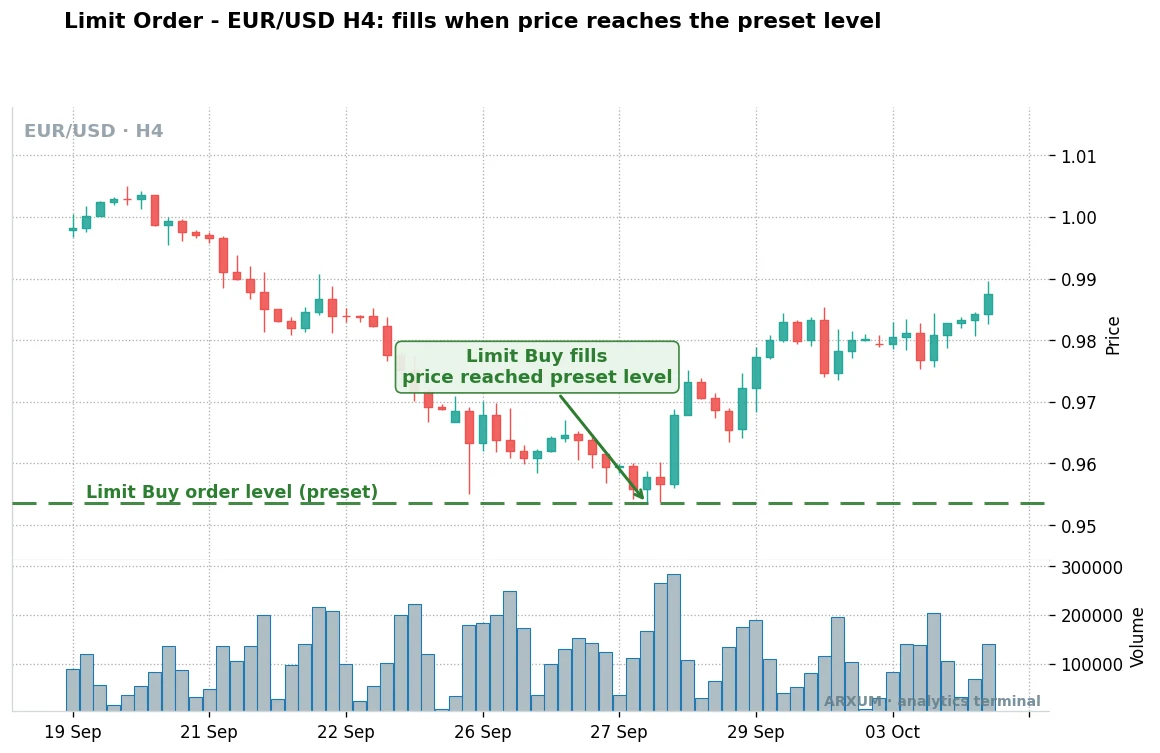
On the chart above, the trader decided in advance where value was and parked a buy limit there. Price drifted down, touched the level, and the order filled without chasing.
How it behaves:
- Fills at your price or better, never worse, so there is no slippage against you.
- May never fill at all if price does not reach your level. That is the trade-off for control.
- A natural fit for resting orders at support and resistance, where you expect price to react.
- Also the standard tool for booking a target: a sell limit above a long is a take-profit.
| Role | How to use it | Best read |
|---|---|---|
| Dip entry | Buy limit at support | Range or pullback into value |
| Fade entry | Sell limit at resistance | Selling into an overextension |
| Take-profit | Limit at your target | Locking gains without watching |
Rule of thumb: use a limit when you have a price in mind and you can afford to miss the trade if the market never comes to you. Patience buys you a better fill.
Stop orders: trigger on the breakout, or protect the downside
A stop order is dormant until price reaches its level, then it fires as a market order. A buy stop sits above the market, a sell stop sits below.
It is the mirror image of a limit.
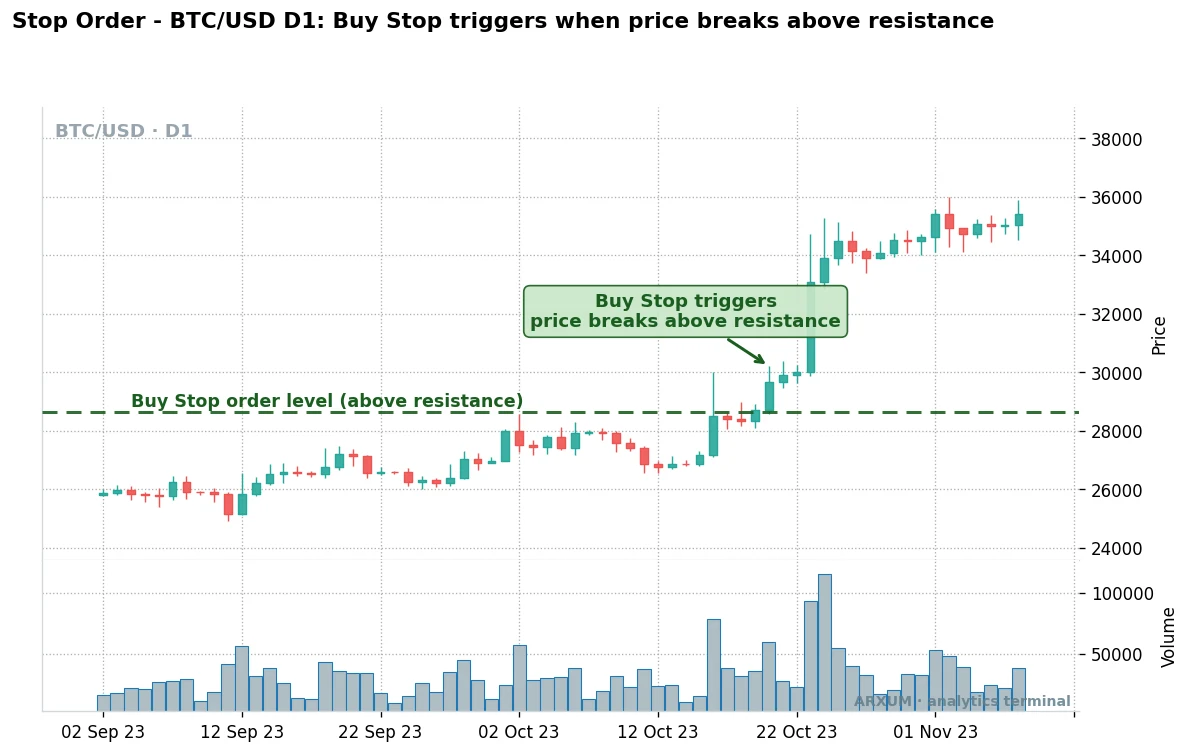
Bitcoin here shows the classic use. The trader wanted in only if the breakout was real, so the buy stop stayed above the level until the market proved itself.
A stop order does two very different jobs depending on where you put it.
- As an entry: a buy stop above resistance or a sell stop below support catches a breakout the moment it commits.
- As an exit: a sell stop below your long (or a buy stop above your short) is a protective stop loss that caps the damage.
- Because it fires as a market order, a stop can slip in fast conditions, especially through a weekend gap.
- Where you place the stop and the target together sets the trade’s risk to reward, written 1:X, where the 1 is your risk and the X is the reward.
| Role | How to use it | Best read |
|---|---|---|
| Breakout entry | Buy stop above resistance | Trend or range break with momentum |
| Breakdown short | Sell stop below support | A level giving way on volume |
| Protective stop | Stop beyond your entry | Every trade, no exceptions |
For an exit that follows a winning trade instead of sitting still, the trailing stop loss is the version that ratchets up behind price. More on that below.
The stop limit order: two prices in one ticket
A stop limit order is where the two families meet, and it is the one most beginners fumble. Instead of one price it uses two: a stop (trigger) price and a limit price.
Here is the sequence, step by step.
- Price reaches your stop price. That wakes the order up.
- The order then places a limit at your limit price, not a market order.
- It fills only at that limit price or better. If price runs past the limit before you fill, you get left behind.
So a plain stop guarantees you get in but not at what price. A stop limit guarantees your price but not that you get in at all.
That single trade-off is the whole point.
| Order | Guarantees | Risk you take |
|---|---|---|
| Stop (market) | The fill happens | Slippage, a worse price |
| Stop limit | The price, or better | A missed fill, no trade |
Where it shines: on a thin market or an illiquid crypto pair, where a plain stop could slip badly. Setting a limit a little beyond the stop caps how much slippage you will accept.
Where it bites: on a hard breakout or a gap. If gold jumps 30 points through both your stop and your limit in one candle, the order triggers but never fills, and you watch the move go without you.
A worked feel for it: say EUR/USD trades at 1.0850 and you want in on a break of 1.0900. A buy stop limit with a stop at 1.0900 and a limit at 1.0905 fills you anywhere up to 1.0905.
Break faster than that and you stay flat.
Trailing stops and OCO brackets
Two more order types automate the exit so you are not glued to the screen.
- Trailing stop: a stop that follows price by a set distance, in pips or a percent, and never moves backward. It locks in gains as a trend runs and closes you out when the move turns. Fuller detail in the trailing stop loss guide.
- OCO (one-cancels-the-other): two orders linked so that when one fills, the other cancels. The everyday use is a bracket, a take-profit limit above and a stop loss below a live trade. Whichever hits first ends the trade and kills the leftover.
| Order | Job | Best fit |
|---|---|---|
| Trailing stop | Ride a trend, protect gains | Strong one-way moves |
| OCO bracket | Set target and stop at once | Set-and-forget swing trades |
Rule of thumb: a trailing stop suits a trending asset like gold in a strong run, where you want to let it go as far as it will. An OCO bracket suits a swing trade you cannot babysit.
Market vs limit vs stop: which to use when
This is the decision most traders actually face at the ticket. Pick by what you value most in that moment: certainty of getting filled, control of the price, or catching a move.
| Your situation | Use | Why |
|---|---|---|
| Must be in now | Market order | Execution is guaranteed |
| Want a better price | Limit order | Fills at your level or better |
| Trade the breakout | Buy or sell stop | Fires only once price commits |
| Break, but thin market | Stop limit order | Caps the slippage you accept |
| Protect an open trade | Stop, or trailing stop | Exits when price turns |
| Set target and stop | OCO bracket | Both exits armed at once |
The pattern underneath: limits and market orders are for getting in and out, stops are for reacting to a move you did not want to predict. Most working setups use two or three together, an entry order plus a bracketed stop and target.
Slippage, gaps and partial fills: what can go wrong
Each order type has one main way it disappoints you. Knowing it up front is half the defense.
| Order | Main risk | How to manage it |
|---|---|---|
| Market | Slippage on the fill | Avoid thin hours and news spikes |
| Limit | Never fills | Place it where price is likely to trade |
| Stop | Slips through the level | Widen the stop, size smaller |
| Stop limit | Triggers but misses | Give the limit some room past the stop |
| Any pending | Partial fill | Trade liquid instruments, split large size |
A partial fill happens when the market does not have enough size at your price to fill the whole order at once. Common on large orders or thin crypto pairs, rare on a major like EUR/USD in London hours.
Weekend gaps are the classic stop-killer. A stop resting over the weekend can trigger far from its level when the market reopens, so size the trade for that risk rather than trusting the stop to hold to the cent.
Crypto vs Forex: the platform differences
The order types are the same everywhere, but the plumbing differs, and beginners trip on the details.
- Forex and CFD platforms (MT4, MT5, cTrader): every type here is native. Buy and sell stops and limits, stop limits, and OCO brackets all sit in the standard order ticket.
- Crypto exchanges: naming drifts. Some call a stop limit a “stop-limit,” others bury the plain stop-market under an advanced tab, and a few label OCO exactly as “OCO.”
- Slippage is worse in crypto, especially on smaller altcoins after hours, which is exactly where a stop limit earns its keep.
- Gaps behave differently: crypto trades 24/7 so there is no weekend gap, while Forex and gold gap over the weekend close.
How to place each order (TradingView, MT4 and MT5)
To reproduce these on your own screen, here is where each type lives.
- TradingView: right-click the chart, choose Trade, then Create Limit or Create Stop order, or drag the order line to your level. The buy or sell direction and the price sit in the ticket panel.
- MT4 and MT5: open the New Order window (F9), switch Type from “Market Execution” to “Pending Order,” then pick Buy Limit, Sell Limit, Buy Stop, Sell Stop, or the Buy/Sell Stop Limit in MT5.
- Trailing stops live on the open position, not the ticket: right-click the live trade and set the trailing distance.
- OCO / brackets: on most crypto exchanges, look for an OCO tab on the order form; on MT5, attach a stop loss and take profit to the position and the platform manages the pair.
Size the position from the stop, not the entry, so the distance to your stop sets how many lots you click. Free charting on TradingView is enough to place and practice all of this before you risk real money.
What works: the points to remember
Keep these five and you have the whole menu.
- Market order fills now, costs you the spread and any slippage. Certainty over price.
- Limit order fills at your price or better, or not at all. Control over certainty.
- Stop order triggers on a breakout and fires as a market order. Great entry, great protective exit.
- Stop limit order adds a limit to the trigger, so you cap slippage but risk a missed fill. Best on thin markets.
- Trailing stops and OCO automate the exit so a trade manages itself.
No order type is better than another. The right one is the one that matches what you value most on that particular trade, and most real setups combine two or three of them.
Key terms
- Market order: fills immediately at the best available price.
- Limit order: fills only at a set price or better; buy limit below market, sell limit above.
- Stop order: dormant until price hits the trigger, then fires as a market order.
- Stop limit order: a stop that places a limit when triggered, pairing a trigger price with a limit price.
- Trailing stop: a stop that follows price by a fixed distance and never moves backward.
- OCO: one-cancels-the-other, two linked orders where filling one cancels the other.
- Slippage: the gap between the price you expected and the price you actually got.
- Spread: the difference between the bid and the ask, paid on every market order.
- Pip: the smallest standard step a price moves, the unit you measure a stop distance in.
- Lot: the standard trade size unit; how many lots you click sets how much each pip is worth.
- Partial fill: part of your order fills because there was not enough size at your price.
FAQ
What are the main order types in trading?
What is the difference between a stop and a limit order?
How does a stop limit order work?
When should I use a limit order versus a market order?
What is a market order?
What is a stop loss and which order type is it?
Do order types work the same in crypto and Forex?
Why did my stop limit order not fill?
What order types should a beginner start with?
What do the key order terms mean?
Real-time trade setups with entry, stop loss and take profit. Daily market analysis. No subscription, no complicated theory.
🌍 Our recommended brokers


Reader Reviews
Be the first to review this — tell other traders what actually helped, or where it fell short.
Leave a Review

Momentum Trader & Technical Analyst
Trades momentum across crypto and forex since 2019, built around RSI, MACD, and volume. Turns discretionary setups into rule-based, systematic entries and validates them on data before they go live.