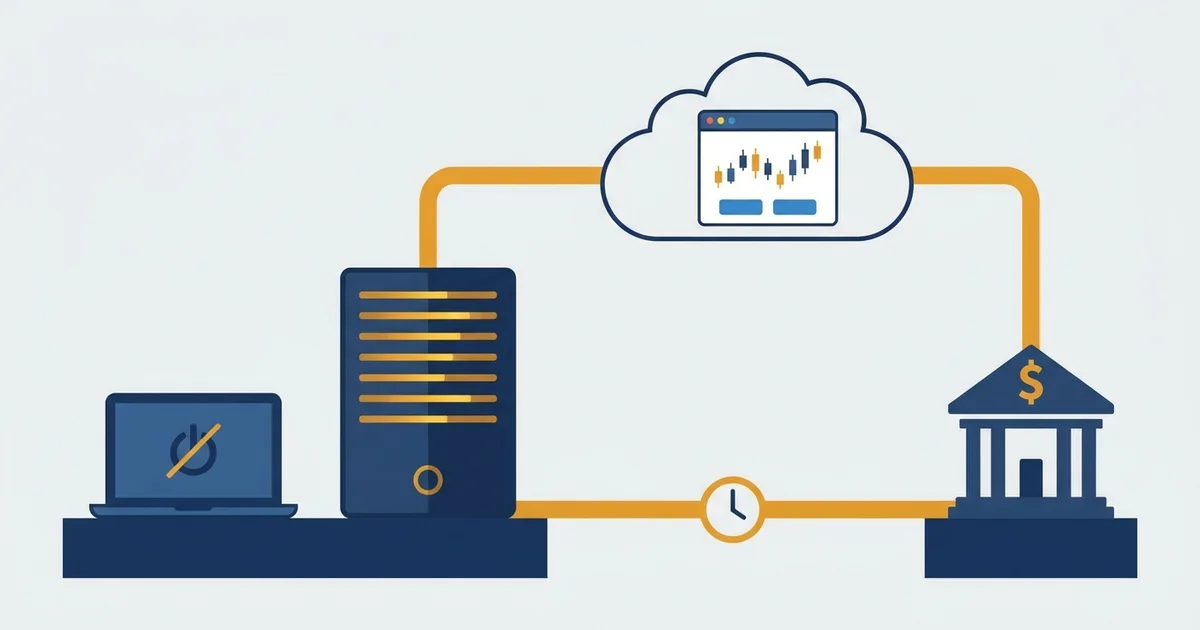

What a forex VPS actually is
A forex VPS is just a computer you rent in a data center that never sleeps. You do not touch the hardware.
You log in over the internet and use it like a second trading PC that happens to run every hour of the week.
Here is the kind of signal that computer exists to catch.
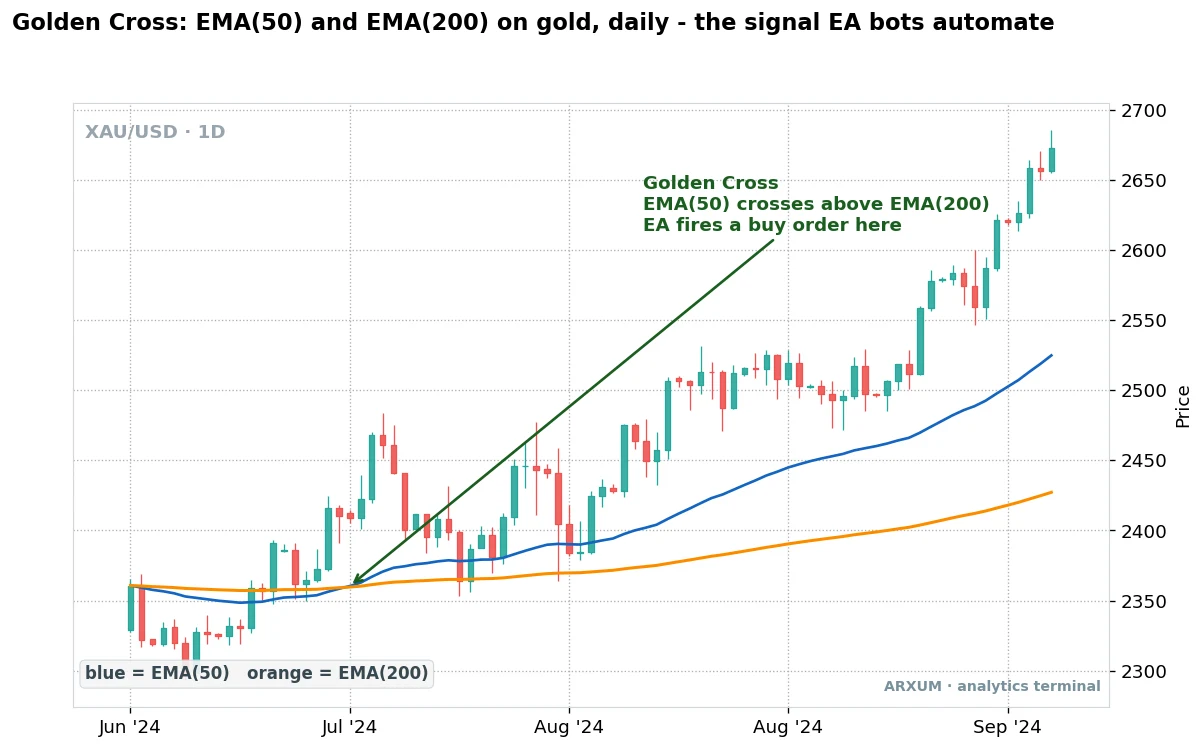
That cross is a moving average crossover, and an expert advisor watches for it every candle. The VPS is what keeps the platform awake to see it.
| Term | What it is | Plain read |
|---|---|---|
| VPS | A rented always-on remote computer | Your trading PC in the cloud |
| RDP | Remote Desktop connection | How you log in to it |
| EA | Expert Advisor | An automated trading program |
| Latency | Time an order takes to reach the broker | Lower means faster fills |
| Uptime | Share of time the server stays live | 99.9% is the standard |
| MT4 / MT5 | The MetaTrader platforms | Where most EAs run |
The core idea is that simple. The value is in the fact that it never turns off and it sits close to the broker.
Do you need a VPS for forex trading?
Most manual traders do not. A VPS earns its keep the moment something needs to run without you sitting there.
| You are | Need a VPS? | Why |
|---|---|---|
| Running an EA or bot 24/5 | Yes | It must never drop offline |
| A scalper chasing fast fills | Yes | Latency changes the price you get |
| Copy-trading a signal 24/5 | Yes | Signals arrive at any hour |
| On a shaky home connection | Yes | No dropped or half-sent orders |
| A manual swing trader, few trades | Rarely | Your own laptop is enough |
| A beginner still on demo | No | Wait until you automate |
The honest test is one question: does something need to be running while your computer is not? If yes, you want a VPS.
If no, you are paying for uptime you will not use.
- The line that matters is automation, not skill. A profitable manual trader with a stable connection gains little. An EA user gains a lot.
- Uptime is the product. You are renting the guarantee that nothing goes dark, not a faster brain.
- Start when you automate. There is no reason to rent a server to click buttons yourself.
Why traders run a VPS
The reasons all come back to one thing: an automated strategy is only as reliable as the machine it runs on. A home PC is the weak link.
| Benefit | The problem it solves |
|---|---|
| Around-the-clock uptime | Your PC or laptop being off or asleep |
| Outage protection | A power cut or internet drop mid-trade |
| Lower latency | Slow orders when you sit far from the broker |
| Access from any device | Being stuck at one desk to check positions |
| A clean, dedicated environment | Windows updates or games crashing your platform |
The uptime point is easy to underrate until a fast EA is live. Here is a faster signal than the daily gold cross above.
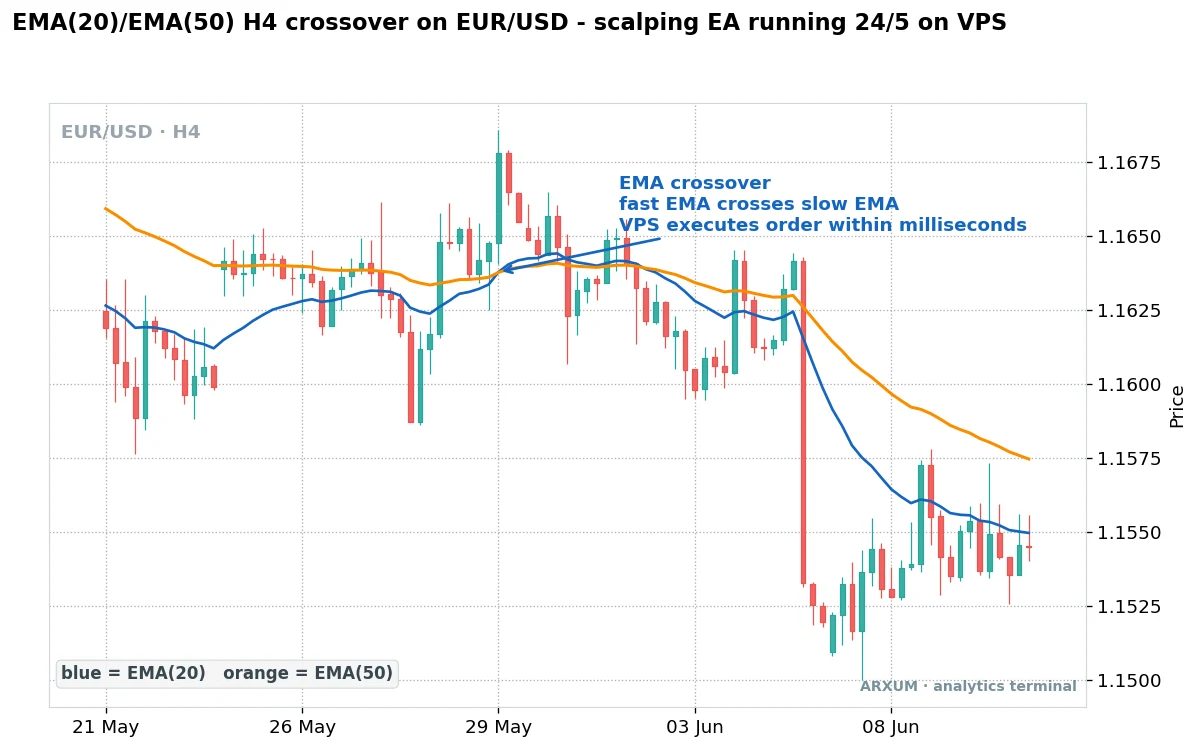
- The market does not wait for your timezone. Forex runs 24 hours, five days a week. A signal at 3am is worth the same as one at noon.
- Home internet fails at the worst time. Outages cluster around storms and heavy load, which is often when markets move.
- A dedicated box stays clean. No auto-updates rebooting mid-trade, no other software fighting for memory.
If you are choosing what to actually run on it, our guides to automated trading bots and scalping strategies cover the systems that most need this uptime.
Latency and broker proximity
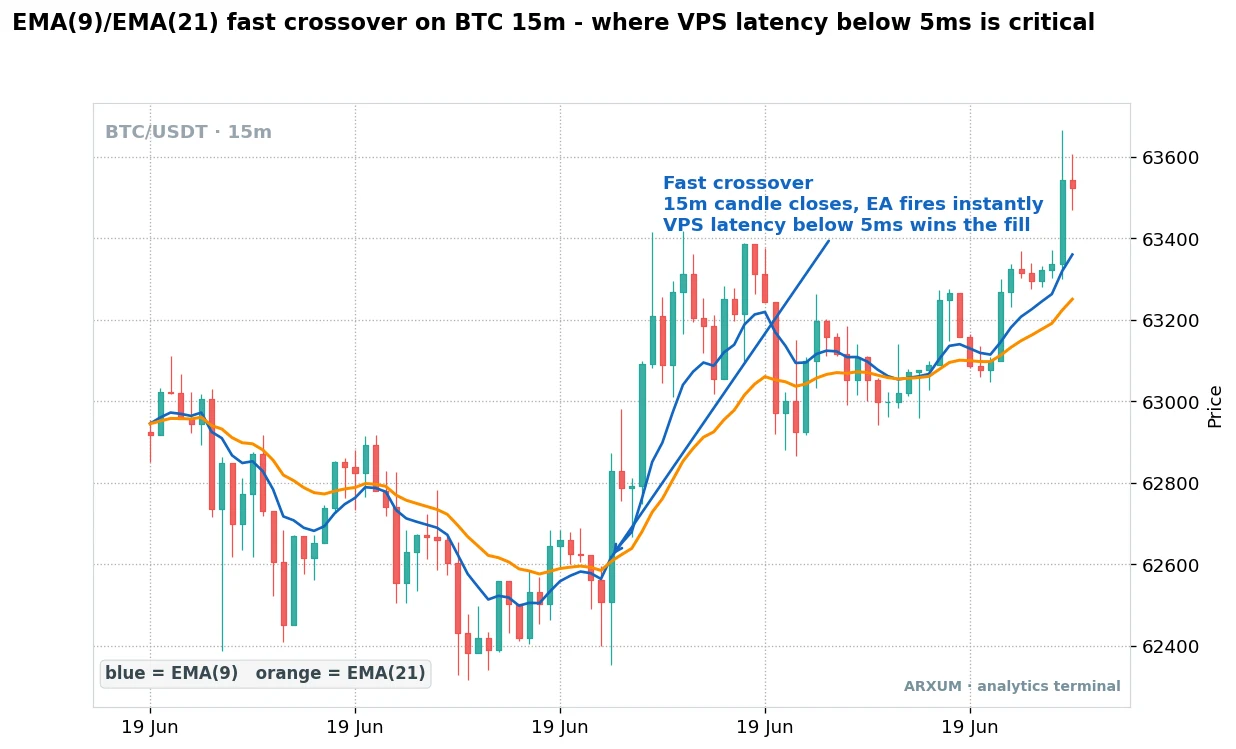
Latency is the time your order takes to travel from the platform to the broker and back. On a slow strategy it barely registers.
On a fast one it decides the fill.
The faster the timeframe, the more it matters.
| Setup | Latency matters | Why |
|---|---|---|
| Daily swing EA | Barely | Slow signals, loose fills |
| H4 or H1 EA | Somewhat | Faster, but a second is fine |
| M15 and below scalper | A lot | Milliseconds move the fill price |
| News-reaction EA | Critically | Spreads jump in a blink |
| Arbitrage-style bot | Extreme | Speed is the whole edge |
The way you cut latency is physical distance. You put the server in the same data center region as your broker.
| Your broker's servers | Best VPS location | Data center |
|---|---|---|
| UK and EU brokers | London | Equinix LD4 |
| US brokers | New York | Equinix NY4 |
| Asian brokers | Tokyo or Singapore | Equinix TY3 / SG1 |
| Crypto exchanges | Same region as the exchange | Varies by venue |
- Ask the broker where their servers live. Most run out of Equinix LD4 in London or NY4 in New York. Put your VPS in the same building and the round trip drops to single-digit milliseconds.
- From a home connection the same trip can run 50 to 100 milliseconds or more, depending on distance. For a scalper that gap is the difference between the price you saw and the price you got.
- If you trade slow, ignore all of this. A daily-chart EA does not care about a few milliseconds.
Key specs for a VPS for MT4 and MT5
A forex VPS does not need to be powerful. It needs to be stable and correctly located.
MetaTrader is light, but it must run on Windows.
| Spec | Minimum | Why it matters |
|---|---|---|
| Operating system | Windows Server | MT4 and MT5 need Windows |
| RAM | 1 GB per MT4 instance | Each platform and EA uses memory |
| Storage | SSD, 30 GB or more | Faster and steadier than a hard disk |
| CPU | 1 to 2 vCPU | Enough for a handful of charts |
| Uptime SLA | 99.9% or better | This is the whole point |
| Latency to broker | Under 5 ms ideal | Tight fills for fast EAs |
- RAM is the spec you scale. One MT4 with one EA is happy on 1 GB. Run four platforms at once and you want 4 GB.
- Windows is non-negotiable for MetaTrader. A cheap Linux VPS looks tempting but will not run MT4 or MT5 natively.
- SSD over a spinning disk. Charts redraw and log files write constantly, and an SSD keeps that smooth.
- The SLA is the contract. A 99.9% uptime guarantee is roughly nine hours of downtime a year. Anything less written down means the provider is not confident.
How to set up a forex VPS step by step
Once you have picked a provider, the setup is quick. The order below is the whole job.
- Choose a provider in the right region for your broker, at a spec that fits how many platforms you will run.
- Get your login details. The provider emails an IP address, a username and a password for the remote connection.
- Connect over RDP. On Windows, open Remote Desktop Connection and enter the IP. On a Mac, use the free Microsoft Remote Desktop app. You now see the server’s desktop.
- Install MT4 or MT5 on the server the same way you would on any PC: download the installer from your broker and run it.
- Copy your EA files across. Drag the EA files into the MetaTrader Experts folder, then restart the platform so it sees them.
- Attach and configure the EA. Drop it onto the right chart and timeframe, enter your settings, and enable automated trading.
- Test, then leave it running. Confirm the platform is connected and the EA is live, then close the remote window. The server keeps working with nothing on your screen.
That is the value in one sentence: you close the window and the machine carries on. Before you trust real money to it, run the system on demo on the VPS first, exactly as you would forward-test any strategy.
What a forex VPS costs
Forex VPS hosting is cheap next to almost any trading cost. Price tracks memory, location and how tuned the routing is.
A cheap forex VPS is not a false economy either, as long as the strategy is slow. The entry tier runs a daily-chart EA just as reliably as a premium plan does.
| Tier | Price per month | What you get |
|---|---|---|
| Entry | $5 to $10 | 1 GB RAM, one or two EAs |
| Standard | $15 to $30 | 2 to 4 GB, several platforms |
| Low-latency | $30 to $50 and up | More RAM, tuned broker routing |
| Broker free VPS | $0 with conditions | Needs a minimum deposit or volume |
Many brokers hand you a free VPS if you clear a threshold, which is worth knowing before you pay for one.
- The free broker VPS has strings. It usually needs a minimum balance, say a few thousand dollars, or a set number of lots traded each month. Miss the threshold and it starts charging.
- Free is fine if you qualify. If your account already sits above the deposit line, take the broker’s VPS and skip the bill.
- Cheap is fine for slow EAs. A daily-chart system runs perfectly on a $5 entry plan. Do not overpay for latency you will not use.
- Pay up only for speed. The low-latency tier is worth it for scalpers and news traders, and no one else.
Choosing the best forex VPS
There is no single best forex VPS, only the best fit for your broker and your strategy. Rank providers on these, in this order.
| What to check | Why it matters | Quick read |
|---|---|---|
| Location | Sets your latency | Match the broker's region |
| Specialization | Forex-tuned vs general cloud | Forex hosts pre-tune routing |
| Uptime guarantee | The core promise | Want 99.9% in writing |
| Support hours | Markets run around the clock | 24/7 beats business hours |
| Price | Monthly cost | Cheap is fine for slow EAs |
The providers fall into two camps, and the right one depends on whether latency is your edge.
- Forex-specialized hosts like ForexVPS, Beeks and FXVM sit inside the big financial data centers and pre-tune routing to broker servers. You pay a little more for latency you can measure.
- General cloud hosts like Contabo are cheaper and fine for a slow EA, but they are not built around broker proximity, so latency is whatever it is.
- The decision is one fork. If milliseconds change your fills, buy the specialist. If they do not, a general host or the broker’s own free VPS is plenty.
If you are still choosing the broker itself, our roundup of brokers for automated trading covers which ones offer a free VPS and how their execution stacks up.
What to remember
A forex VPS is infrastructure, not a strategy. It will not make a losing system win.
It will keep a working one running.
- Only automation needs it. If nothing runs while your computer is off, you do not need a VPS yet.
- Location beats horsepower. Match the data center to your broker’s region. That, not CPU, is what cuts latency.
- Match the spend to the speed. A slow EA runs on a $5 plan. Pay for low latency only if you scalp or trade the news, and take the broker’s free VPS if you already qualify.
Glossary: the key forex VPS terms
- Forex VPS: a remote always-on Windows server that runs your trading platform and EAs so they never go offline.
- VPS: virtual private server, a slice of a data center machine rented to you like your own computer.
- RDP: Remote Desktop, the tool you use to log in to the server and see its screen.
- EA (Expert Advisor): an automated program that trades your rules inside MT4 or MT5 without you clicking.
- Latency: the round-trip time for an order between your platform and the broker, measured in milliseconds.
- Ping: a quick test of that round-trip time; a lower ping means a closer, faster connection.
- Uptime and SLA: the share of time the server stays live, and the written guarantee of it.
- Data center: the building your server lives in; LD4 (London) and NY4 (New York) are the main forex ones.
FAQ
Do I need a VPS for forex trading?
You need one if something has to run while your computer is off, such as an expert advisor, a trading bot or a copy-trading signal. A VPS keeps the platform online around the clock and sits close to the broker to cut latency. If you are a manual trader who places a few trades yourself on a stable connection, you do not need one yet.
What is a forex VPS, in plain terms?
It is a remote Windows computer you rent in a data center that never turns off. You log in to it with remote desktop, install MetaTrader and your EAs, and leave it running. It works like a second trading PC in the cloud, so your automated strategy keeps trading even when your own machine is off or your internet drops.
How do I set up a forex VPS?
Choose a provider in your broker's region, then use the IP address and password they send to connect over Remote Desktop. On the server, install MT4 or MT5 from your broker, copy your EA files into the Experts folder, attach the EA to the right chart and enable automated trading. Test it on demo first, then close the window and leave the server running.
How much does a forex VPS cost?
Most plans run between $5 and $50 a month. An entry plan with 1 GB of RAM for one or two EAs costs around $5 to $10, while a low-latency plan tuned for scalping runs $30 to $50 or more. Many brokers also offer a free VPS if your account meets a minimum deposit or monthly trading volume.
What specs do I need for MT4 or MT5 on a VPS?
MetaTrader is light. You need Windows Server, at least 1 GB of RAM for each MT4 instance you run, SSD storage of about 30 GB, and one or two virtual CPU cores. The specs that matter most are a written uptime guarantee of 99.9% or better and a location close to your broker's servers for low latency.
Is a free forex VPS any good?
A broker-provided free VPS is usually fine, as long as you meet its conditions, which are normally a minimum account balance or a set trading volume each month. If you already keep enough in the account, it is worth taking and saves the monthly fee. If you fall below the threshold, the broker starts charging, so read the terms first.
Will a VPS make me a better trader?
No. A VPS is infrastructure, not a strategy. It keeps a working system running reliably and can improve fills on fast strategies through lower latency, but it will not turn a losing EA into a winning one. Treat it as a reliability tool for automation, not as an edge in itself.
Where should my forex VPS be located?
In the same data center region as your broker's servers. Most forex brokers run out of Equinix LD4 in London or NY4 in New York, so a VPS in that region cuts the round trip to single-digit milliseconds. Ask your broker where their servers sit, then pick a matching location. If you trade slow timeframes, location barely matters.
Can I run MT4 and MT5 on the same VPS?
Yes. You can install several platforms and multiple accounts on one VPS, from MT4 and MT5 to different brokers side by side. Just size the RAM for it, roughly 1 GB per MT4 instance, so nothing slows down. Running four platforms at once means you want around 4 GB rather than the entry-tier 1 GB.
Is a forex VPS safe and secure?
A reputable provider runs the same security as any business server, and your trading account is still protected by the broker's own login. Keep the VPS safe by using a strong Remote Desktop password and only installing trusted EA files. The bigger risk is not security but running an untested or poorly built EA, so vet the strategy before you leave it alone.
Real-time trade setups with entry, stop loss and take profit. Daily market analysis. No subscription, no complicated theory.
🌍 Our recommended brokers


Reader Reviews
Be the first to review this — tell other traders what actually helped, or where it fell short.
Leave a Review

Quant Researcher & Systems Builder
Quantitative researcher who builds the automated systems behind Arxum strategy testing. Works in Python and Pine Script, using AI alongside classic backtesting to validate strategies on years of real data.