

Why your journal tool actually matters
Most traders treat the journal as an afterthought. Log the trade, note the outcome, move on. That habit keeps win rates flat.
The tool changes the habit. When I switched from a plain Excel file to a structured journal with mandatory entry-quality tagging, my weekly review sessions went from 10 minutes of P&L scrolling to an hour of actual pattern recognition. That single change identified one setup I was forcing (entries I rated 1-2 out of 5 on quality) that was responsible for 70% of my drawdown across six months of data.
Here’s the counterintuitive finding: outcome tracking is the least useful field in a trading journal. The traders who improve fastest track entry quality, not win/loss results. A clean entry on a bad day can still produce a loss. A forced entry on a good day can still hit target. The journal that makes it easy to score process quality, not just P&L, is the one worth paying for.
What to look for before you choose
Not all journals solve the same problem. Before committing, check four things:
- Auto-import capability: manually entering 30 trades per day kills compliance. If your broker isn’t supported, you won’t maintain the habit.
- Trade tagging and filtering: you need to filter by setup type, session, entry quality, pair, and timeframe independently.
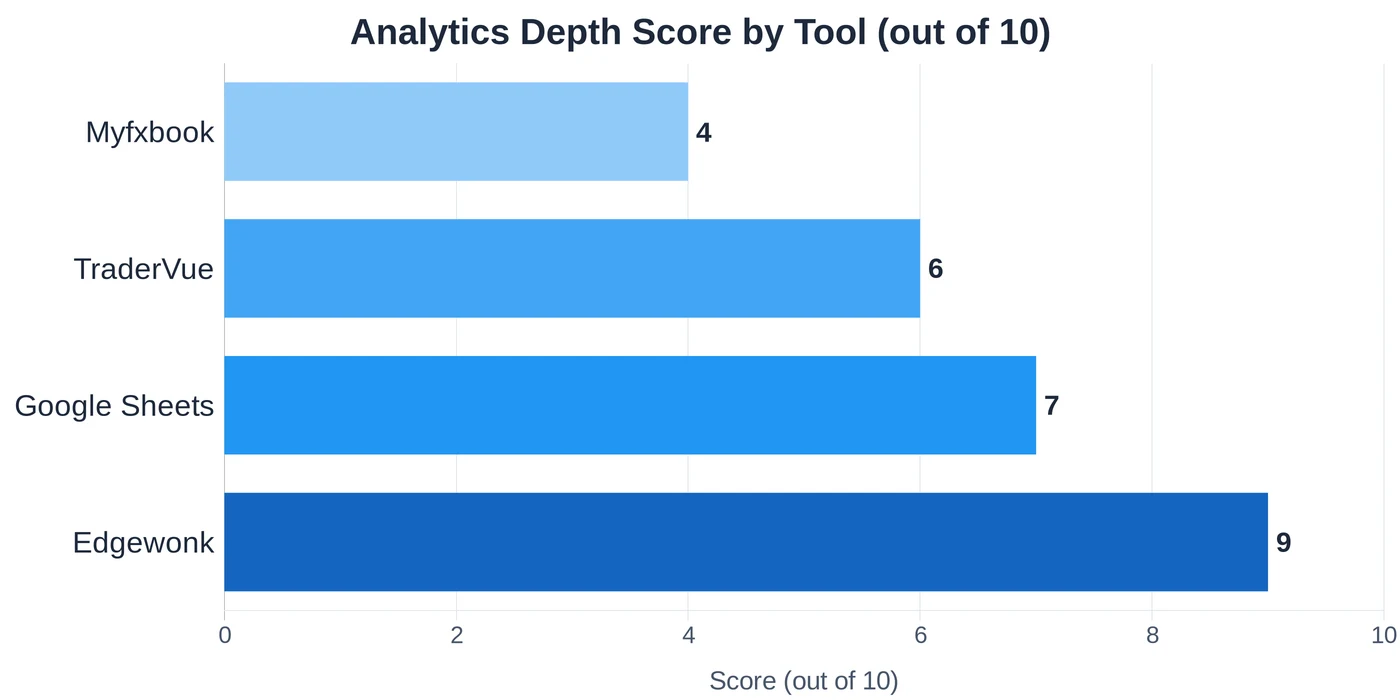
- Analytics depth: does it show win rate by setup? By time of day? By market condition? Simple equity curves don’t give you actionable information.
- Cost relative to trading frequency: if you take 20 trades per month, a $14/month subscription isn’t justified. Consistent use of a free tool beats an abandoned paid one.
The best trading journal apps in 2026
Edgewonk
Edgewonk is the benchmark for active discretionary traders. The analytics engine goes beyond P&L: it tracks trade efficiency (did you exit at the right time?), custom psychology tags, a simulator mode for replaying entry decisions, and setup-specific filtering that most journals skip entirely.
Setup takes about 30 minutes to configure properly: pair groups, custom setup names, preferred risk metrics. After that, every import runs fast and pattern reports generate in seconds.
I ran a trial of Edgewonk’s cross-platform version in Q4 2025 to benchmark it against my custom system. The trade efficiency metric caught something my own sheets missed: I was consistently exiting EUR/USD daily positions too early, leaving roughly 40% of the potential move on the table. That finding alone changed how I set targets on trend-following entries.
Price: $169/year. Two-device license. No recurring subscription beyond the annual renewal.
Best for: Traders with 20-100 trades per month who want to diagnose specific weaknesses in execution, not just track outcomes.
Limitation: Check broker compatibility before buying. Auto-import covers MT4/MT5 and select proprietary platforms. No native mobile app.
TraderVue
TraderVue is the strongest free-tier journal for traders just starting to track results. The free plan covers up to 30 trades per month with basic analytics. Paid plans ($29-49/month) unlock unlimited imports and advanced filtering.
The platform is web-based (no installation) and imports directly from MT4, Interactive Brokers, and several US equity platforms. The tagging system is simpler than Edgewonk, with fewer custom fields, but that’s an advantage if you’re building the journaling habit from scratch. Fewer configuration choices means you start logging on day one instead of spending a week setting up.
TraderVue includes a community benchmarking feature that shows how your performance compares to traders using similar setups. Treat that data with caution: self-selection bias skews the sample toward traders already performing well.
Price: Free (30 trades/month) | $29-49/month for unlimited.
Best for: Beginners building the habit, or MT4/MT5 traders who want automatic import without manual data entry.
Myfxbook
Myfxbook is the only serious free option for forex traders. It connects to your broker via read-only API credentials and pulls trade history automatically. Analytics include equity curves, drawdown charts, MAE/MFE analysis, and community statistics.
The limitation is depth. Myfxbook focuses on what happened: outcomes, timing, trade duration, rather than why. There’s no entry quality scoring, no psychology tagging, no setup categorization. It’s excellent for the performance layer: which pairs you’re profitable on, what time of day your worst drawdowns cluster. For diagnosing process-level weaknesses, it’s thin.
For forex traders who want to verify broker execution (slippage tracking is built in) and generate a verified track record to share publicly, it’s genuinely useful.
Price: Free.
Best for: Forex traders on MT4/MT5 who want automatic sync and don’t need deep analytics.
Google Sheets with a structured template
For traders with fewer than 50 trades per month, a well-built Sheets template outperforms every paid tool in one dimension: flexibility. You track exactly what you want, in the format your analysis requires, with calculations tailored to your strategy.
My own journal runs in Sheets. Every trade logs: pair, date, session, timeframe, setup type, entry quality (1-5), entry price, stop, target, actual exit, planned risk/reward ratio vs actual R:R, and a one-line note on what drove the entry decision. Pivot tables aggregate by setup, by quality score, by session. The whole system took four hours to build and has run unchanged for two years.
The time cost is real: expect 2-3 minutes per trade to log manually. The trade-off is that you understand every data point because you built the system.
The companion trading journal guide on this site includes a free template based on the exact field structure I use. Start there before paying for any software.
Price: Free.
Best for: Systematic and algo traders who want complete control over data structure, or anyone testing the habit before committing to a paid tool.
Comparison: key features at a glance
| Tool | Price | Auto-import | Analytics depth | Best for |
|---|---|---|---|---|
| Edgewonk | $169/year | MT4/MT5 + others | Deep | Active discretionary traders |
| TraderVue | Free / $29-49/mo | MT4/MT5, IB | Moderate | Beginners, MT4/MT5 users |
| Myfxbook | Free | Forex brokers (API) | Basic | Forex performance tracking |
| Google Sheets | Free | Manual | Custom | Systematic traders, low volume |
Choosing based on your trading style
Day traders (20+ trades per week): Edgewonk or TraderVue paid tier. Manual logging at this frequency is unrealistic. You need reliable auto-import and the ability to filter by session and time of day automatically.
Swing traders (5-20 trades per month): Google Sheets or Edgewonk. Volume is low enough that manual logging is manageable. Edgewonk’s trade efficiency metric is particularly useful for swing traders who exit too early against their original target.
Systematic and algo traders: Build your own database. I write trade logs from TradingView webhook alerts directly to a local SQLite file via a Python script, then query with Pandas for any analysis I need. No SaaS tool handles custom systematic data cleanly: they are all built around discretionary trade fields.
Traders testing the habit: Start with the free trading journal template and track 30 trades before spending anything. Most traders underestimate how long it takes to build a consistent logging habit. A paid tool won’t fix inconsistency.
Common mistakes to avoid
Logging only outcomes. Win/loss tracking without setup or entry quality tagging tells you nothing actionable. A journal that shows “you lost 8 trades this month” is useless. One that shows “you lost 8 trades on forced setups rated 2/5 entry quality, and won 12 on setups rated 4-5/5” gives you something to fix.
Changing tools every few weeks. Pattern recognition requires consistent data across months. Switching from Edgewonk to Sheets after three weeks resets your dataset. Pick a tool, commit to 90 days, then evaluate.
Skipping the weekly review. The journal is a data collection system. The value is in the review. Logging trades daily without reviewing weekly is like collecting blood pressure readings without ever looking at the trend.
Over-engineering from day one. Start with five fields: date, pair, setup type, outcome, one-line note. Add entry quality and R:R tracking in week two. Build complexity as the habit solidifies.
Abandoning the journal during losing streaks. That’s exactly when you need it most. Behavioral patterns that cause consecutive losses show up in the data, but only if you logged honestly during the losing period.
Good trading psychology starts with accurate self-knowledge. A trading journal, kept honestly across several months, builds that picture faster than anything else available to a retail trader.
FAQ
What is the best free trading journal?
Is Edgewonk worth paying for?
Can I use Myfxbook for crypto trading?
How many trades should I log before analyzing my journal?
What fields should I track beyond P&L?
Do professional traders use trading journals?
Real-time trade setups with entry, stop loss and take profit. Daily market analysis. No subscription, no complicated theory.
🌍 Our recommended brokers


Reader Reviews
Edgewonk changed how I think about exit timing. I ran the trade efficiency report on three months of EUR/USD data and found I was leaving 30-40% of each move on the table by closing early. One metric, one specific change, measurable result.
I switched from a basic Excel file to Edgewonk after reading this comparison and the trade efficiency metric alone justified the $169. My review sessions used to be just P/L scrolling - 10 minutes looking at numbers that told me nothing. Now I spend 45 minutes every Sunday going through setup-specific win rates, session performance, and entry quality scores. In two months I identified that my London open GBP/USD entries rated 3 or below on quality were responsible for 60% of my total drawdown for the quarter. That kind of clarity is worth paying for.
The advice about tracking 50 trades per setup before drawing conclusions saved me from a bad decision. I was about to drop my EUR/USD breakout strategy after 20 trades showed a 40% win rate. Held on, logged 30 more, and the rate came out to 57%. Statistical variance is real and this article explains it in practical terms, not just theory.
Good breakdown but I would have liked more detail on Myfxbook broker compatibility. The article correctly identifies that it is best for forex on MT4/MT5, but I use Pepperstone via cTrader and had to dig elsewhere to confirm the connection is not supported. The core advice is solid - I started with Google Sheets as suggested, built the habit over 60 trades, then upgraded to TraderVue. That sequencing worked exactly as described. Recommend this path for anyone starting out.
Started with the Google Sheets template after reading this and tracked 80 trades before touching any paid tool. Now running TraderVue on the paid tier and the transition was smooth because I already knew which fields I needed. Practical advice that actually saves money.
The section on common mistakes is the best part. Logging only outcomes without entry quality scoring is exactly what I was doing for a year and the journal told me almost nothing. Three months after adding a 1-5 quality score to every entry I could see clearly that my 2-rated entries had a 31% win rate and my 4-5 rated entries had a 64% win rate. Should have made this change sooner.
Used Myfxbook for two years before reading this comparison and realized I was missing the process layer entirely. Myfxbook tracked what happened - outcomes, timing, pair performance. But the why behind each result was invisible. Moved to Edgewonk six months ago and the psychology tagging feature showed a pattern I had no idea existed. My worst trades clustered between 15:00-16:00 UTC, overlapping London close with NY afternoon drift. Once I stopped forcing entries in that window my monthly return went from 5.8% to 8.2% without changing anything else. The journal data made a case I could not argue against with intuition alone.
The point about changing tools every few weeks resetting your dataset is something every newer trader needs to read. I went through four tools in six months because I kept looking for the ideal interface. What actually helped was committing to TraderVue for 90 days straight and letting the data build. Win rate patterns became visible around trade 70. Nothing special about any one tool - consistency is the actual variable.
Leave a Review

Quant Researcher & Systems Builder
Quantitative researcher who builds the automated systems behind Arxum strategy testing. Works in Python and Pine Script, using AI alongside classic backtesting to validate strategies on years of real data.