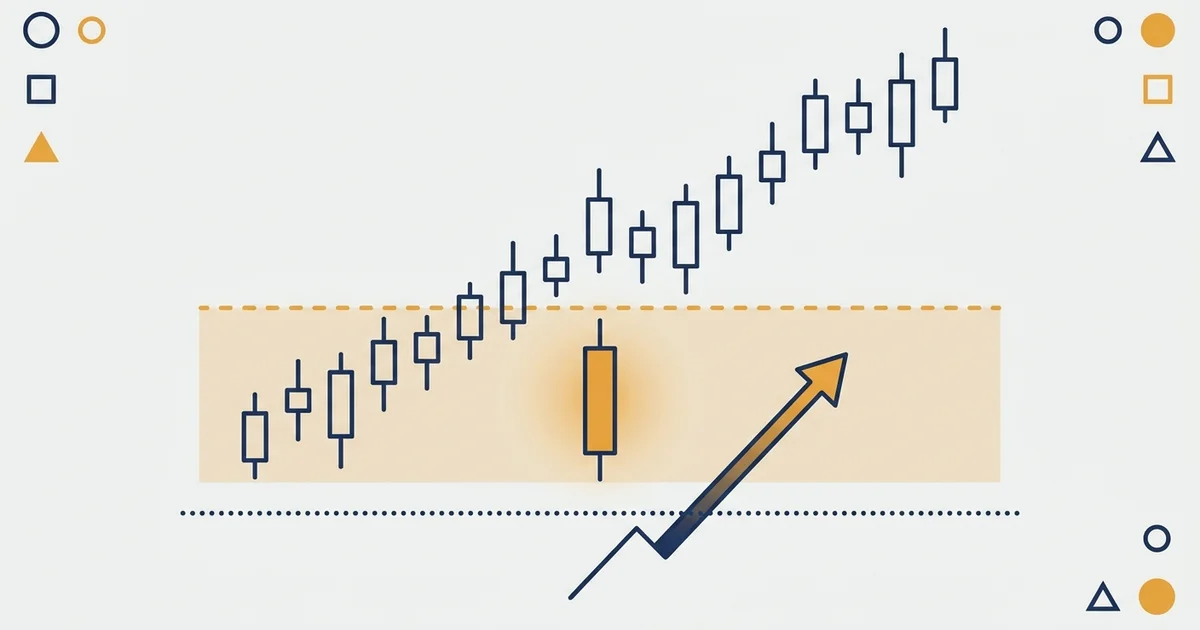

What a stop limit order looks like
Here is a buy stop-limit on daily gold, from the moment it goes in to the fill. The two horizontal lines are the whole order.
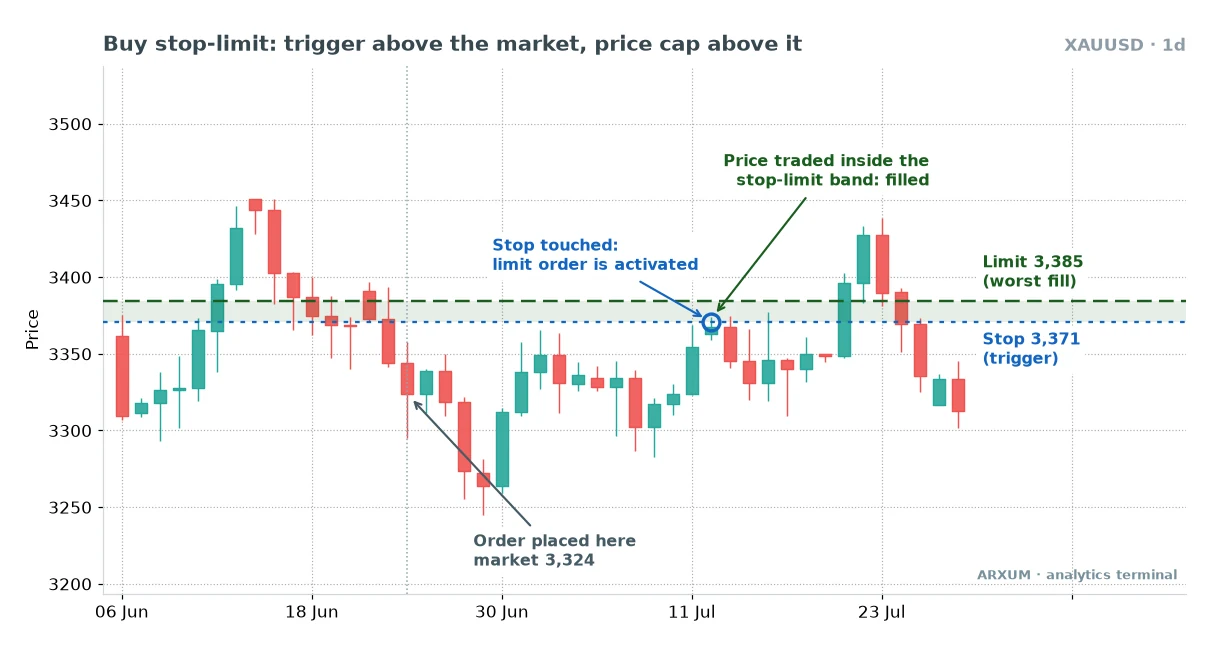
Read the chart left to right:
- Order placed at 3,324. Nothing happens yet. The order waits on the broker’s server, not in the market.
- Price climbs to 3,371. The stop is touched. At that instant the order turns into a buy limit at 3,385.
- The fill. The trigger candle traded inside the shaded band, so the buy went through somewhere between 3,371 and 3,385.
- The case it protects against. Had gold jumped from 3,360 straight to 3,400, nothing would fill. The limit forbids paying more than 3,385.
- What happened next: price slipped back under the trigger, then pushed to about 3,430. The order controls your price, not the direction afterward.
That last point matters more than it looks. The order handles execution, while your stop-loss decides what happens if the breakout fails.
How does a stop limit order work, step by step
Every stop-limit goes through the same four stages, on every platform:
- Placed. You enter a stop price, a limit price, a size and an expiry. The order is dormant.
- Triggered. The market reaches the stop price. The order becomes a regular limit order.
- Working. The limit order waits for a price at the limit or better. Better means lower for a buy, higher for a sell.
- Filled, partly filled or stranded. If price trades inside the band, you are in. If it has already run past the limit, the order sits unfilled until price returns or you cancel it.
The ticket itself has four fields. Here they are with the gold numbers from the chart above.
| Field | Job | Gold example |
|---|---|---|
| Stop price | Trigger | 3,371 |
| Limit price | Worst fill | 3,385 |
| Size | Lots or coins | 0.01 lot |
| Expiry | How long it waits | GTC |
A lot is the standard unit of trade size, so 0.01 lot is a micro lot, the smallest size most brokers allow.
GTC means good till cancelled: the order stays until it fills or you delete it. The other common choices are Day, which expires at the session close, and a set date.
What actually triggers the stop
This detail catches people on Forex and CFD platforms (a CFD, or contract for difference, tracks an asset’s price without you owning the asset). Your chart usually shows the Bid, the price you can sell at, while you buy at the Ask, which sits a spread higher.
- A buy stop-limit triggers when the Ask reaches the stop price.
- A sell stop-limit triggers when the Bid reaches the stop price.
- When the spread widens, at a quiet hour or around news, a buy order can trigger with the chart line still a few pips short. A pip is the standard small price step, 0.0001 on EUR/USD.
- Crypto exchanges trigger on the last traded price by default. Futures platforms often let you switch to the mark price, a smoothed fair value that ignores single spiky trades.
The guide to the Forex spread shows how wide that gap gets at different hours.
Buy stop-limit vs sell stop-limit
The two directions mirror each other. The buy version waits above the market for strength; the sell version waits below for weakness.
| Order | Stop sits | Limit sits |
|---|---|---|
| Buy stop-limit | Above price | At or above stop |
| Sell stop-limit | Below price | At or below stop |
What each one is for:
- Buy stop-limit: entering an upside breakout, or closing a short if price rises against you.
- Sell stop-limit: entering a downside breakdown, or closing a long if price falls against you.
- The distance between stop and limit is your tolerance. Zero distance means “this exact price or nothing”; a wide gap behaves almost like a plain stop.
One platform flips this layout, and it is the most popular one in Forex. The MT5 section further down covers it.
Stop vs stop-limit vs limit order: the difference
So what is the difference between a stop and a limit order? A stop waits for price to move through a level, a limit waits for a better price.
The stop-limit borrows the trigger from one and the price cap from the other.
| Feature | Stop | Stop-limit | Limit |
|---|---|---|---|
| Trigger | Yes | Yes | No |
| Becomes | Market order | Limit order | Already limit |
| Fill | Near certain | Inside band only | Your price or better |
| Slippage | Can be large | Capped | None against you |
| Main risk | Bad fill | No fill | Missed move |
| Typical use | Stop-loss | Controlled breakout | Dips, targets |
Slippage is the gap between the price you expected and the price you got. A plain stop accepts any slippage, the stop-limit caps it, and the slippage guide shows where it bites hardest.
How to pick between them in one line each:
- Plain stop: getting in or out matters more than the price.
- Stop-limit: you want the move, but only up to a price that still makes the trade worth it.
- Limit: you want a better price than now and can wait for it. The limit order guide covers this one, including market order vs limit order.
Where the stop-loss fits
A stop-loss is not a separate order type. It is a stop order you attach to an open trade so it closes if price moves against you by a set amount.
- On MT4, MT5 and most Forex platforms, the stop-loss field is a plain stop, so it fills as a market order.
- On many crypto spot exchanges, the usual way to set a stop-loss is a sell stop-limit. That changes the risk, as Method 3 shows.
- A trailing stop is a stop-loss that follows price as the trade moves your way. The trailing stop guide covers it.
Where to place the stop-loss in the first place is its own subject; the stop-loss strategy guide walks through structure, ATR and time-based stops.
Method 1: the breakout stop-limit
A breakout entry needs a stop order, because you only want in once price proves it can clear the level. The stop-limit adds a ceiling, so a candle that rips well past your level can’t hand you its worst price.
Here is the sell side on Bitcoin, a breakdown on the 15-minute chart.
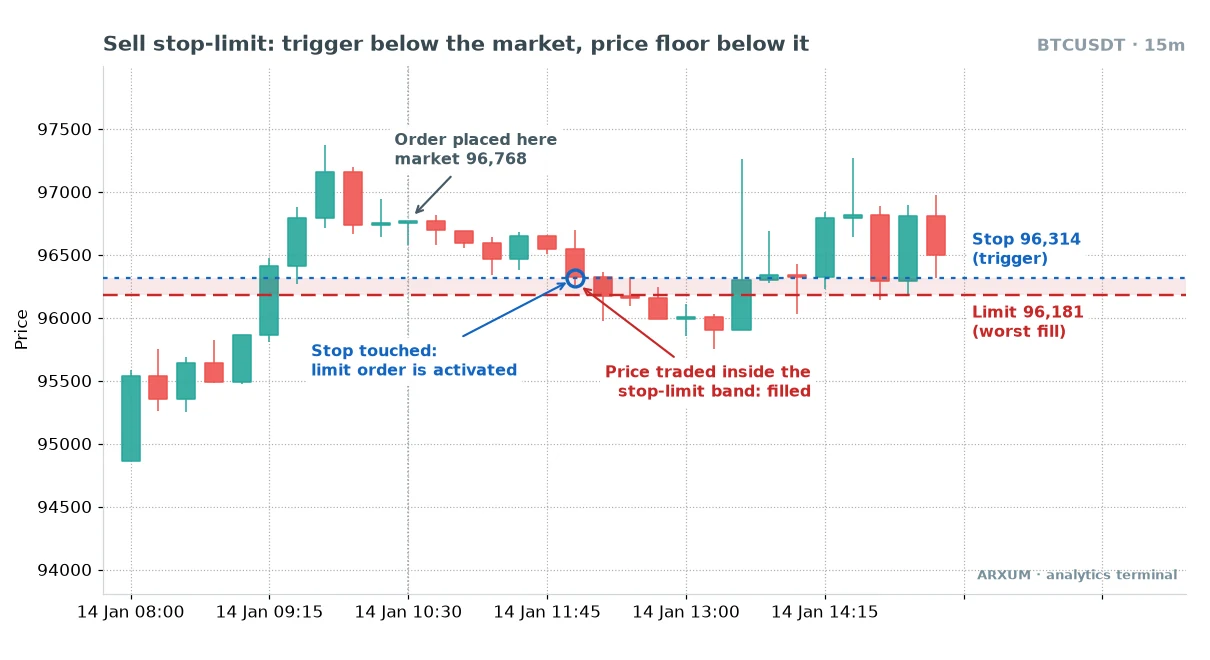
What the chart shows:
- The order sits under a small shelf of candles that had been drifting lower.
- Stop to limit is 133 dollars, about 0.14% of the price. That is wide enough to fill on a normal 15-minute candle and tight enough to refuse a crash fill.
- The trigger candle broke the shelf, and the next candles traded inside the band. The sell filled close to plan.
- Within about two hours Bitcoin was back above the order price. The fill was clean; the breakdown failed.
That last bullet is the honest part: the order protects the entry price, and only a stop-loss above the shelf protects the trade.
Breakouts fail often, which is why the breakout trading guide spends as much time on false breaks as on real ones.
How traders use the stop-limit in a breakout plan:
| Role | How you use it | Best read |
|---|---|---|
| Entry trigger | Stop just past the level | H4, D1 FX and gold |
| Price cap | Limit a small step beyond | All markets |
| Trend context | Trade the trend side only | D1 chart |
| Fast-chart entry | Tight band, small size | M15 Bitcoin |
| Exit pairing | Stop-loss plus target | Every trade |
Where to put the two prices
- The stop: a little past the level, so a single touch of the exact high or low doesn’t trigger it. A few pips on major pairs, a few dollars on gold.
- The limit: far enough from the stop for a normal candle to fill you, close enough that the worst fill still leaves a sensible stop-loss distance.
- A handy ruler: the Average True Range, or ATR, which measures how far price moves in a typical candle. A band of roughly 10% to 25% of the 14-period ATR on your chart’s timeframe is a common starting point. The ATR guide explains the reading.
- Your level: a real one. A shelf price has bounced from several times, as in the support and resistance guide, beats a random round number.
Those rules translate into different numbers on each market and timeframe. Treat the table below as starting points to adjust for your own chart, not as proven values.
| Market | TF | Stop past level | Stop to limit |
|---|---|---|---|
| EUR/USD | H4 | 3-5 pips | 5-10 pips |
| GBP/USD | H4 | 5-8 pips | 8-15 pips |
| EUR/USD | D1 | 5-10 pips | 10-20 pips |
| Gold | H1 | $1-2 | $3-5 |
| Gold | D1 | $3-5 | $10-15 |
| Bitcoin | M15 | ~0.05% | 0.1-0.2% |
| Bitcoin | D1 | ~0.3% | 0.5-1% |
GBP/USD gets wider numbers than EUR/USD because the pound moves further per candle and its spread is usually a little wider. Gold on the daily chart needs dollars, not cents, because a single day can swing $30 to $60.
Rule of thumb: if the band is so tight that normal candles skip it, you are using a limit order with extra steps.
Method 2: the gap guard
Forex closes for the weekend and reopens on Sunday evening, often at a different price. A plain buy stop fills at whatever the reopen offers; a stop-limit can refuse.
This is a 4-hour EUR/USD chart where exactly that happened.
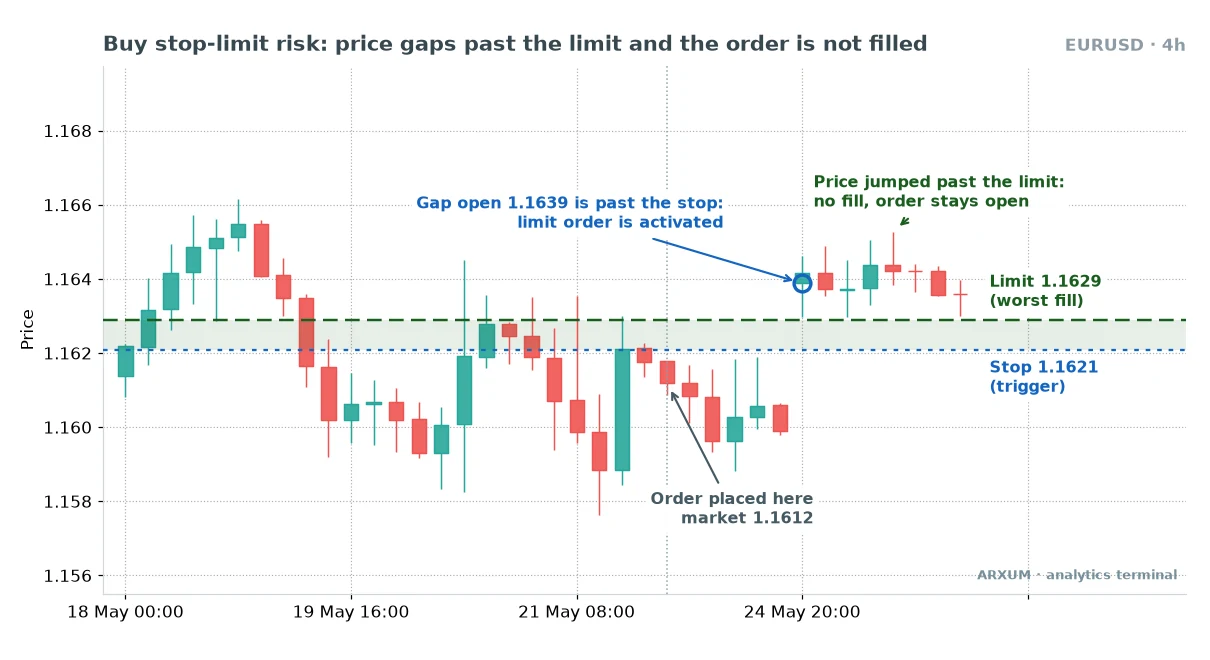
Walk through it:
- The week closes with EUR/USD below the stop. The order is still dormant.
- The market reopens at 1.1639. That is 18 pips above the trigger and 10 above the limit.
- The jump activates the order, which now waits as a buy limit at 1.1629.
- Price drifts sideways above that line and never comes back down to it. No fill.
Was that a missed trade? Yes, and a deliberate one.
The trade you planned, entering near 1.1621 with the stop-loss distance you sized for, no longer existed at 1.1639.
A plain buy stop would have filled around 1.1639. With a 50-pip stop-loss planned from 1.1621, that fill adds 18 pips of risk, more than a third on top.
On a fixed lot size, the loss if it fails grows by the same share.
Where gaps and spikes come from
| Market | Gap source | Guard useful |
|---|---|---|
| EUR/USD, GBP/USD | Weekend, big news | Yes |
| Gold | Weekend, daily break, US data | Yes |
| Stock indices | Every cash open | Yes |
| Bitcoin spot | No gaps, sharp wicks | For wicks |
| CME Bitcoin futures | Weekend close | Yes |
Bitcoin trades all week on crypto exchanges, so it rarely gaps there. It does print long wicks in thin hours, and a stop-limit keeps you out of the worst of those.
The Forex market hours guide marks the reopen and the quiet windows, and the gap trading guide covers trading the gap itself.
How the gap guard fits into a plan:
| Role | How you use it | Best read |
|---|---|---|
| Weekend filter | Hold breakout orders as stop-limit | H4, D1 |
| News filter | Swap stops for stop-limits | M15, H1 |
| Session open | Guard the London spike | M15 FX, gold |
| Cancel rule | Delete if price runs away | All |
The cancel rule is the piece most people forget. An activated, unfilled order can sit there for days and then fill on a pullback, long after the setup stopped making sense.
- Decide in advance when the idea expires. One candle past the limit on H4, or the end of the session on M15, are common choices.
- If price has run a full stop-loss distance past your limit, delete the order.
- Before high-impact news, such as US payrolls or an inflation release, check the band is wide enough for the widened spread. A spread blowout can trigger the stop and still leave the order outside the band.
Method 3: the stop-limit as a protective exit
On many crypto spot exchanges, a sell stop-limit is the standard way to set a stop-loss on coins you hold. It works most of the time, with one trap that hurts in a crash.
| Scenario | Plain stop | Stop-limit |
|---|---|---|
| Steady decline | Fills near stop | Fills in band |
| Fast crash | Fills, with slippage | May not fill |
| Flash wick | Fills at the wick | Often skips it |
| Gap below limit | Fills at the gap | No fill |
Read the table as a trade-off, not a winner:
- In a flash wick, the stop-limit can save you. Price spikes down, skips your band, then recovers, and you still hold the position.
- In a real crash, the same behaviour hurts. Price falls through the band, the sell never fills, and you are holding with no stop at all.
- An exit stop-limit that doesn’t fill is no stop-loss. It is a sell order parked above the market, while the position keeps losing.
You can’t know in advance which of the two you’ll get. So the exit version needs a wider band than the entry version, and a habit of checking.
How to use it as an exit without getting stranded:
- Make the exit band wider than an entry band. Roughly double the Method 1 distances is a sensible start: wider than any normal candle, so only a true gap skips it.
- On Forex and CFD platforms, keep the must-exit stop-loss a plain stop. The MT4 and MT5 stop-loss field already works that way.
- Use the exit stop-limit where the venue offers nothing else, or on thin altcoins where a market sell could fill at an absurd price.
- After a trigger, look. If the order shows as activated but unfilled, close the position yourself.
- Expect partial fills. A limit can sell only part of your size if the bids inside the band run out.
| Role | How you use it | Best read |
|---|---|---|
| Protective stop | Sell stop-limit under swing low | BTC, ETH spot |
| Profit lock | Move it up as trend runs | D1, H4 |
| Short cover | Buy stop-limit above swing high | Crypto futures |
| Thin-coin exit | Wide band, smaller size | Altcoins, D1 |
Moving the order up by hand as the trade works is a manual trailing stop. Each move is a cancel and a new order, so do it on candle closes, not every tick.
Stop-limit orders on MT4, MT5, cTrader, TradingView and exchanges
The order exists almost everywhere, under slightly different names and rules. Use the exact menu names below so you find the right one.
| Platform | Menu name | Watch for |
|---|---|---|
| MT4 | Not available | Use Buy Stop |
| MT5 | Buy Stop Limit | Limit below the stop |
| cTrader | Stop Limit | Limit range in pips |
| TradingView | Stop Limit | Broker must support it |
| Binance, Bybit spot | Stop-Limit | Stop, Limit, Amount |
| Stock brokers | Stop limit | Day or GTC |
The MT5 trap
MT5 builds the order differently from exchanges, and it trips up people who learned the order on crypto.
- On MT5, a Buy Stop Limit has a Price field (the stop, above the current Ask) and a Stop Limit price field (the limit).
- The Stop Limit price sits below the stop, not above it.
- When the Ask reaches the stop, MT5 places a buy limit at that lower price. It waits for price to break out and then pull back.
- So MT5’s version is a breakout-then-retest entry, not a capped breakout. A Sell Stop Limit mirrors it: the limit sits above the stop, waiting for a bounce after the breakdown.
- MT5 has no built-in capped-breakout order. Use a plain Buy Stop and accept the slippage, or use the MT5 version on purpose as a retest entry.
cTrader and the exchanges
- cTrader’s Stop Limit takes a stop price and a limit range in pips. It fills anywhere from the stop to that many pips beyond, which is the exchange idea expressed as a distance.
- On Binance and Bybit spot, the ticket asks for Stop, Limit and Amount. For a sell, set the limit below the stop, or the order may fill instantly or be rejected.
- On TradingView, the order types offered depend on the broker you connect. Stop Limit appears next to Market, Limit and Stop when the broker supports it.
Where to click:
- TradingView: open the chart, press the Buy or Sell button on the trading panel, then pick the Stop Limit tab.
- MT5: press F9 (or right-click the chart, then Trading, then New Order), set Type to Pending Order, then choose Buy Stop Limit or Sell Stop Limit.
- cTrader: open the New Order window, select Stop Limit, then fill in the price and the limit range.
- The ATR ruler from Method 1: on TradingView, search “Average True Range” in Indicators and keep length 14. On MT4 or MT5 it is Insert, then Indicators, then Oscillators, then Average True Range.
Which method to use when
| Situation | Use | Chart |
|---|---|---|
| Clean breakout, normal hours | Method 1 | H4, D1 |
| Fast Bitcoin breakdown | Method 1 | M15 |
| Order held over weekend | Method 2 | H4, D1 |
| News due soon | Method 2 | M15, H1 |
| Protecting crypto you hold | Method 3 | D1 |
| Must-exit stop on FX | Plain stop | Any |
| Buying a dip | Plain limit | Any |
Two lines that tie the table together:
- If missing the trade is worse than a bad price, use a plain stop.
- If a bad price would wreck the trade’s math, use a stop-limit and accept that some orders never fill.
How to place a stop limit order, step by step
If you want to use Method 1 or 2 yourself, this is the sequence. The prices reuse the EUR/USD levels from the Method 2 chart, to show the arithmetic, not a result.
- Mark the breakout level on the H4 chart: the local high of the recent consolidation, just under 1.1621. It is not the top of the whole chart, since price traded higher earlier in the same window.
- Set the stop a few pips past it: 1.1621.
- Set the limit 8 pips beyond: 1.1629. That is your worst possible entry.
- Set the stop-loss under the range low, which sits near 1.1576 on the chart: 1.1570.
- Measure risk from the limit, not the stop. The worst fill is the honest case.
- Size the trade so that worst case costs 2% of the account.
- Set a take-profit at twice the worst-case risk, or at the next resistance if that comes first.
- Choose the expiry, and write down your cancel rule before you click.
Here is the sizing on a $1,000 account.
| Step | Value |
|---|---|
| Stop (trigger) | 1.1621 |
| Limit (worst fill) | 1.1629 |
| Stop-loss | 1.1570 |
| Worst-case risk | 59 pips |
| Risk budget (2%) | $20 |
| Take-profit (1:2) | 1.1747 |
The division, step by step:
- One micro lot (0.01) of EUR/USD moves about $0.10 per pip.
- Worst-case risk per micro lot: 59 pips × $0.10 = $5.90.
- Micro lots allowed: $20 ÷ $5.90 = 3.4, rounded down to 3 micro lots (0.03).
- Risk at the worst fill: 59 × $0.30 = $17.70. If it fills right at the stop: 51 × $0.30 = $15.30. Both sit inside the 2% budget.
- Target: 118 pips above the limit (2 × 59), worth about $35 at 0.03 lots.
The 1:2 is the risk/reward ratio: you risk 1 to aim for 2. The risk/reward ratio guide explains it, and the position sizing guide runs the same division for other pairs.
On leverage: 0.03 lots is 3,000 euros, roughly $3,500 of exposure, so about 1:3.5 on $1,000. A broker’s 1:100 leverage only lowers the deposit needed to open that size; the stop-loss, not the leverage, sets what you can lose.
The same order on gold and Bitcoin
Gold is harder on a small account, because the band and the stop-loss are both measured in dollars:
- At most brokers the smallest gold size is 0.01 lot, which is 1 ounce, so it gains or loses $1 per $1 move.
- With the anatomy chart’s limit at 3,385 and a stop-loss under a nearby low at 3,345, the worst case is $40, or 4% of $1,000. That breaks the 2% rule even at the smallest size.
- The fix: move to the H1 chart. A $5 band plus a stop-loss $15 under the trigger makes a $20 worst case at 0.01 lot, exactly 2%. Or trade the same breakout logic on EUR/USD.
Bitcoin sizes more flexibly, since many crypto venues accept 0.001 BTC:
- From the M15 chart, a short with its worst fill at 96,181 and a stop-loss above the shelf at 96,900 risks 719 dollars per full coin.
- $20 ÷ $719 = 0.0278, so roughly 0.027 BTC, risking about $19.40.
- CFD brokers often set a 0.01 BTC minimum. At that size the same stop risks about $7, well inside the budget.
Risk and discipline with stop-limit orders
- Size on the worst fill. Every stop-limit has two possible entry prices, and only the limit is honest for sizing.
- A refused fill is not a loss. Don’t chase it with a market order a minute later. The order said no for a reason you set yourself.
- Breakouts fail, often. Expect strings of small losses. After 3 to 6 losing breakouts in a row, the market may have turned to a range: pause and re-read the daily chart.
- Check activated exits. A stop-limit exit that triggered and didn’t fill leaves the position naked.
- Don’t widen the band after the trigger to force a fill. That turns a planned trade into the chase you set the limit to prevent.
- Use risk capital only. Money for rent or emergencies doesn’t belong in a trading account, whichever order type you use.
Common stop-limit mistakes
- Setting the limit equal to the stop. Any jump past the trigger skips the fill entirely.
- Setting the band far too wide. It then fills like a plain stop, with the extra complexity and none of the protection.
- Sizing from the stop price. The worst fill is the limit, and that is where the risk must be measured.
- Using a stop-limit as the only stop-loss in a crash-prone coin, then not watching it.
- Forgetting the Ask trigger on Forex. A buy order can trigger off the spread with the chart line untouched.
- Bringing exchange habits to MT5. There, the limit of a Buy Stop Limit sits below the stop.
- Leaving an activated order alive for days. It fills on a random pullback long after the setup died.
- Ignoring the weekend. A breakout order held through Friday’s close is exactly where Method 2 earns its place.
What works: the short version
- Breakouts with a ceiling. Stop just past the level, limit a small step beyond, sized on the worst fill.
- The gap guard. Hold breakout orders over weekends and news as stop-limits, so a gapped open can’t fill you at a price you never planned.
- Exits with care. On crypto spot, a stop-limit exit works with a wide band and a habit of checking. On Forex, keep the must-exit stop a plain stop.
The stop-limit sits in the middle of the order family, between the plain stop and the plain limit. The order types guide puts all of them side by side, including OCO brackets, where filling one order cancels the other.
Glossary
- Stop price: the trigger level that activates the order.
- Limit price: the worst price the order will accept once active.
- Band: the price zone between the stop and the limit, where a fill can happen.
- Bid / Ask: the prices you can sell and buy at. The gap between them is the spread.
- Slippage: the difference between the expected price and the fill you got.
- Gap: a jump between one candle’s close and the next one’s open, common at the weekend reopen.
- GTC: good till cancelled, an order that waits until it fills or you delete it.
- Partial fill: only part of the order’s size gets filled.
- ATR: Average True Range, the typical distance price travels in one candle.
- Pip: the standard small price step, 0.0001 on EUR/USD.
- Lot: the unit of trade size. A standard lot on EUR/USD is 100,000 euros.
- CFD: contract for difference, a contract that tracks an asset’s price without you owning it.
- Micro lot: 0.01 of a standard lot, about $0.10 per pip on EUR/USD.
- Risk/reward 1:2: risking one unit to aim for two.
FAQ
What is a stop limit order, in plain terms?
It is a pending order with two prices. The stop price triggers it, and the limit price is the worst price you will accept. Once the market touches the stop, the order becomes a limit order and can only fill between the two prices. If price jumps past the limit, it does not fill.
How does a stop limit order work?
It waits dormant until price reaches the stop. At that point it turns into a limit order at your limit price. If the market trades at the limit or better, you get filled. If price has already run beyond the limit, the order stays open and unfilled until price comes back or you cancel it. On Forex platforms a buy triggers on the Ask and a sell on the Bid.
What is the difference between a stop and a limit order?
A stop order waits for price to move through a level, then becomes a market order, so it fills almost always but at an uncertain price. A limit order waits for a better price than now and fills only at that price or better. A stop sits on the side price is moving toward; a limit sits on the side you hope it pulls back to.
Is a stop-loss or a stop-limit better for protecting a trade?
For a stop that must get you out, a plain stop-loss is safer, because it fills even in a fast market, just at a worse price. A stop-limit protects the price but not the exit: if the market falls through your band, the order never fills and the position keeps losing. Use a stop-limit exit with a wide band where the venue offers nothing else, or on thin coins, and check it after it triggers. On MT4 and MT5 the stop-loss field is already a plain stop.
Can a stop-limit order fail to fill?
Yes. If price jumps past your limit, through a gap or a fast candle, the order activates but never fills.
How far should the limit price be from the stop price?
Far enough for a normal candle to fill you, close enough that the worst fill still leaves sensible risk. A common starting point is 10% to 25% of the 14-period ATR on your chart's timeframe. On EUR/USD H4 that often lands around 5 to 10 pips; on 15-minute Bitcoin around 0.1% to 0.2% of the price. Exit orders need a wider band than entries.
Does MT4 have stop-limit orders?
No. MT4 offers Buy Stop and Sell Stop only. MT5 has Buy Stop Limit and Sell Stop Limit, but its limit sits on the other side of the stop, so it works as a breakout-then-retest entry.
When should I use a limit order vs a market order?
Use a market order when getting in or out right now matters more than the exact price. Use a limit order when you have a price in mind and can wait, such as a pullback or a profit target. A stop-limit fits between them: you want in on the move, but only up to a set price.
What do the terms on the stop-limit charts mean?
The blue dotted line is the stop price, the trigger. The dashed line is the limit, the worst fill. The shaded band between them is where the order can fill, and the blue circle marks the candle that activated it. The grey arrow and dotted vertical line show when the order was placed. 1d, 4h and 15m mean one candle per day, per four hours and per 15 minutes.
Real-time trade setups with entry, stop loss and take profit. Daily market analysis. No subscription, no complicated theory.
🌍 Our recommended brokers


Reader Reviews
Be the first to review this — tell other traders what actually helped, or where it fell short.
Leave a Review

Momentum Trader & Technical Analyst
Trades momentum across crypto and forex since 2019, built around RSI, MACD, and volume. Turns discretionary setups into rule-based, systematic entries and validates them on data before they go live.